Sold Out: The Ultimate Guide to Managing Events & Tours on Lnkk.it


For creators, the screen is just the starting point. The real magic happens irr real life (IRL)—at comedy shows, workshops, gallery openings, and world tours. But managing these events across multiple platforms is a nightmare. Enter the Lnkk.it Events App: your centralized command center for selling out venues.
The Problem: "Link in Bio" Chaos
Imagine this: You're a comedian on a 5-city tour. You have ticket links for Ticketmaster, Eventbrite, a local club's website, and a Google Form for a private show.
How do you put all of that in one Instagram bio?
Most creators assume they have to choose just one link. They pick their biggest show, and the other 4 suffer. This is money left on the table.
The Solution: One List to Rule Them All
The Lnkk.it Events App allows you to create a beautiful, scrollable feed of all your upcoming appearances. Whether it is a single Zoom workshop or a year-long world tour, your fans see everything in chronological order.
Key Features for Professionals
Direct Ticket Integration: We don't take a cut. You link directly to where the transaction happens (Eventbrite, Ticketmaster, etc.).
Visual Posters: Don't just use text. Upload your tour poster or show flyer to grab attention instantly.
Smart Sorting: As soon as an event date passes, it automatically archives itself. Your page never looks outdated.
Case Study: The "Stand-Up Special" Strategy
Let's look at how pro comedian Jubilant Jas increased her ticket sales by 40%.
Before: she posted individual flyers on her Story, hoping people would click the "Link in Bio" within 24 hours. The link only went to one venue at a time.
After: She set up the Events App on her Lnkk.it.
Top of Funnel: A pinned "TICKETS" button on her Instagram profile.
The Experience: Fans clicked and saw a clean list: Mumbai, Delhi, Bangalore, London.
The Conversion: Users could see dates 3 months in advance and book immediately.
"I used to spend hours updating my Linktree every weekend. Now I upload my tour dates once, and Lnkk.it handles the rest. My London show sold out 2 months early." — Jubilant Jas
For Educators & Coaches: Workshops that Fill Up
You don't need to be a celebrity to use this. If you host:
Yoga Retreats
Pottery Classes
Coding Bootcamps
Webinars
The Events App adds a layer of professionalism. It tells your potential students: "This is a legitimate operation." The ability to add location maps (via our Google Maps integration) alongside the event details reduces anxiety for first-time attendees.
How to Setup Your Tour (Step-by-Step)
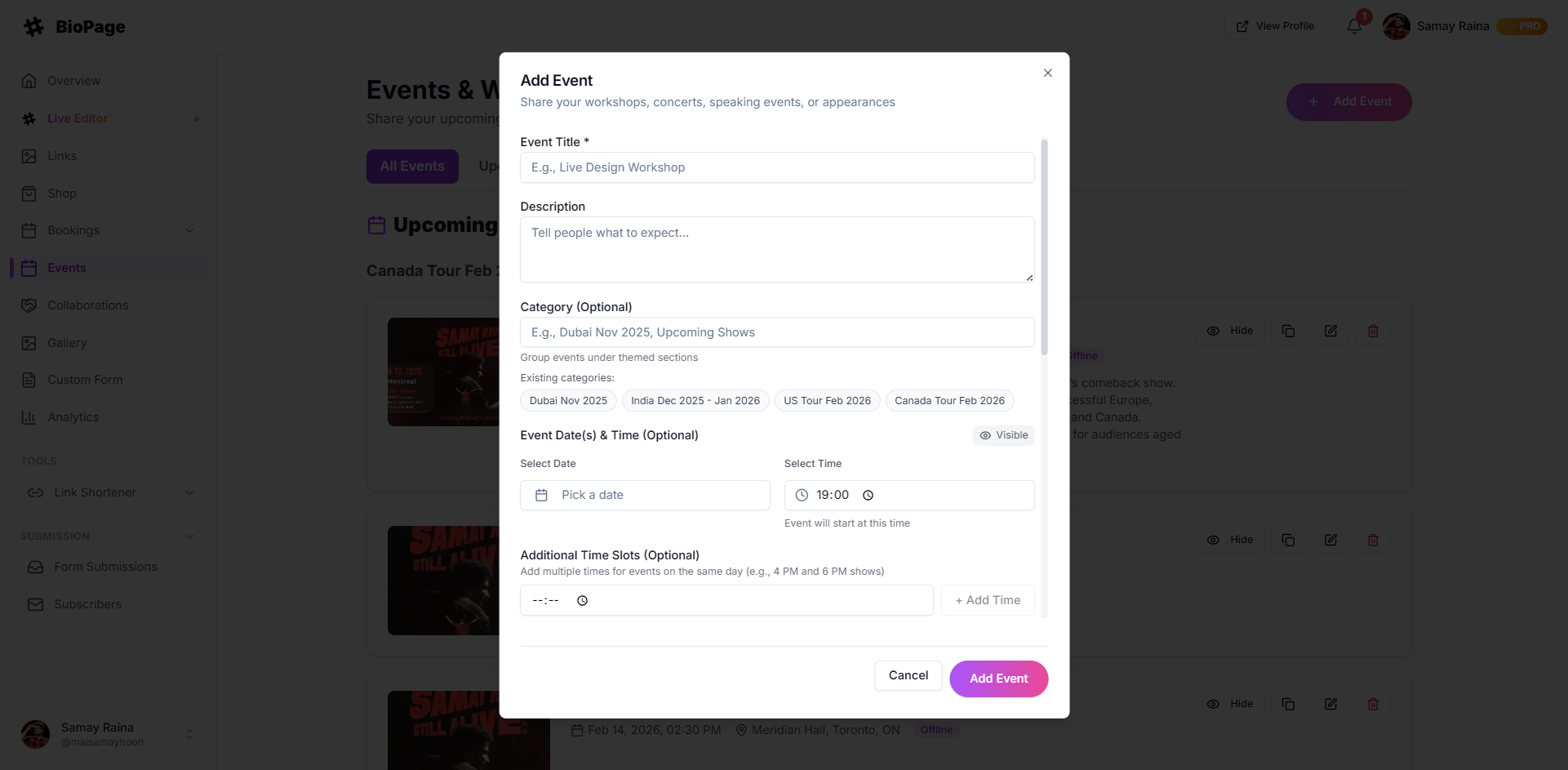
Creating your first event takes less than 60 seconds.
Go to Dashboard → Events.
Click + Add Event.
Title: Be catchy! "Summer Vibes Tour" works better than just "Live Show".
Poster: Upload a square or landscape image (1080x1080 works great).
Venue & City: This helps with local SEO within our platform.
Ticket Link: The most important part. Paste your checkout URL.
Repeat for every date. You can drag and drop to reorder, though we recommend keeping them chronological.
Advanced Tip: The "FOMO" Effect
Even if an event is sold out, don't delete it immediately! instead, edit the title to say "[SOLD OUT] Live at The Apollo" and keep it on your list for a few days.
Why? It creates social proof. It tells visitors, "Wow, this person sells out. I better book the next one fast."
Conclusion
Your events are the physical manifestation of your community. Treat them with the respect they deserve. Stop hiding them behind confusing navigation trees.
YOU MAY ALSO LIKE

Silence the Noise: Why Every Podcaster Needs Lnkk.it Smart Links
Stop alienating half your audience with the wrong link. Learn how to use Podcast Smart Links to share your show across Spotify, Apple, and Google automatically.

Showcase Your Sound: The Ultimate Guide to the Lnkk.it Spotify App
Turn your bio link into an audio experience. Learn how to embed Spotify tracks, albums, and podcasts directly onto your Lnkk.it for higher engagement.

Musicians, Your Fans Are Getting Lost: How to Create the Perfect Artist Link in Bio
You have 8 streaming platforms but only 1 bio link. Learn how musicians use Lnkk.it to route fans to Spotify, Apple Music, merch, and tour dates—all from one smart link.